
Samsung Kids
Screenshots
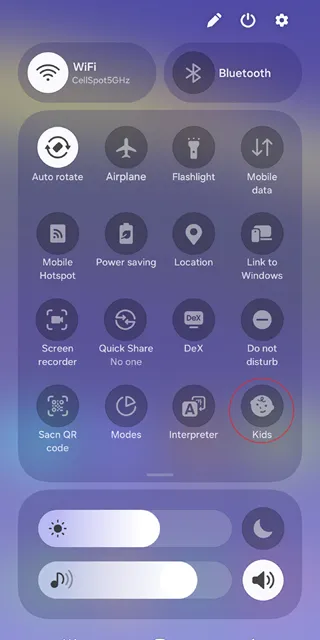
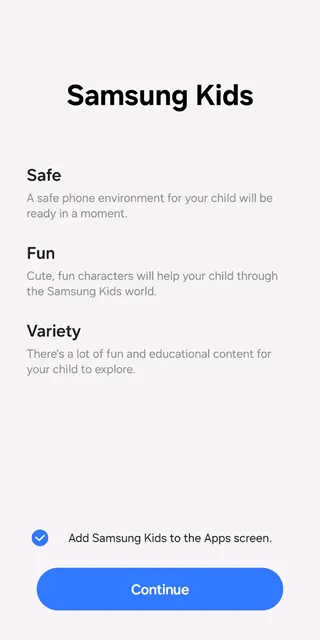
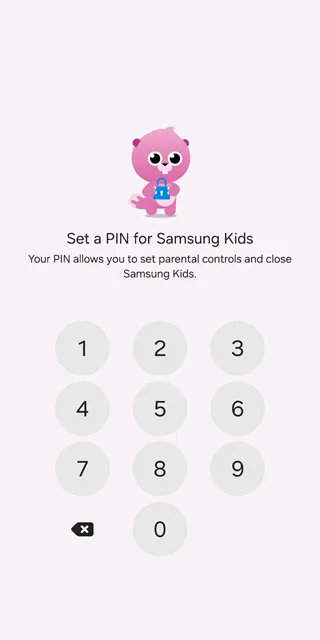
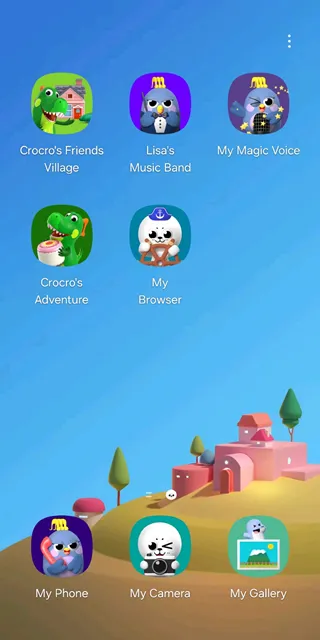
Samsung Kids provides a secure digital environment where young children can explore, learn, and play safely. Moreover, this application creates a separate home screen that restricts access to unauthorized device functions and sensitive private data. Consequently, parents can hand over their smartphones to toddlers without worrying about accidental calls or accidental data deletion.
In addition, the platform offers tailored educational games that stimulate creativity and critical thinking skills in young minds. Therefore, children enjoy a fun experience while acquiring essential foundational knowledge through interactive animated characters. Furthermore, this safe ecosystem eliminates unwanted commercial interruptions by blocking third-party advertisements completely during active play sessions.
Exploring the Child-Friendly Digital Environment
Firstly, Samsung Kids transforms a standard mobile interface into a colourful kingdom filled with engaging native applications. Children easily navigate this custom space because the interface utilizes large icons and intuitive touch controls for simple operation. As a result, even very young toddlers can interact with the various activities without requiring constant parental guidance.
Secondly, parents maintain absolute authority over this environment by securing the exit gate with a private access code. That is to say, the child cannot leave the protected interface unless the guardian inputs the correct security credentials. Consequently, the phone remains entirely locked down to prevent exposure to regular web browsers or social media networks.
Key Features of Samsung Kids App For Android
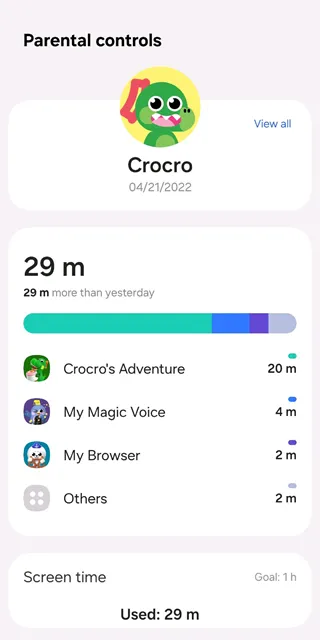
To clarify, the primary features of Samsung Kids focus on safety, education, and detailed parental supervision options. For example, the system tracks daily usage patterns and generates comprehensive reports regarding the most frequently visited applications. In other words, you receive clear visual charts that illustrate exactly how your child spends time on the device.
Above all, these integrated tools allow guardians to customize the virtual space based on individual family needs. Further, you can add specific approved applications from the main device memory directly into the children’s custom menu. Thus, the application expands alongside your child’s growing interests by adapting to their changing educational requirements over time.
Custom Playtime Limits
Setting healthy boundaries becomes incredibly straightforward because the system includes a precise countdown timer for daily screen usage. Parents can choose unique time allocations for weekdays and weekends to accommodate busy school schedules and relaxed holiday periods. Once the designated session expires, the screen locks automatically and displays an animated character sleeping peacefully.
However, children can request additional minutes if the guardian decides to extend the playtime via the pin code. This approach teaches young users valuable lessons about time management and prevents arguments when screen time concludes. In short, the feature enforces healthy digital habits without requiring constant verbal arguments between parents and children.
Educational Native Applications
The default software package contains multiple custom characters who guide users through various specialized learning activities. For instance, Crocro teaches basic problem-solving skills, while Cooki introduces creative artistic concepts through painting challenges. These friendly guides make learning feel like an exciting adventure rather than a tedious classroom chore.
Additionally, Bobby invites children to explore musical rhythms by experimenting with different virtual instruments and sound effects. Meanwhile, Lisa offers storytelling adventures that improve language comprehension and vocabulary acquisition through interactive narrative choices. To sum up, these diverse applications nurture balanced cognitive development by touching upon multiple creative and analytical disciplines.
Secure Web Browsing
Guardians can whitelist specific educational websites so that children can research topics for school projects safely. The internal browser automatically blocks all unapproved web pages and filters out malicious content before it loads. Therefore, young users can explore the internet freely within a heavily protected perimeter managed entirely by their parents.
In addition, Samsung Kids prevents children from clicking external hyperlinks that lead out of the approved domain names. This strict filter guarantees that accidental clicks never expose young minds to inappropriate adult media or advertisements. Consequently, you can allow independent internet research while maintaining total peace of mind regarding digital safety.
Advanced Parental Control Dashboard
The central control panel provides a detailed breakdown of activity logs, download histories, and media creation galleries. You can review the photos your child captured or check the voice recordings they made during playtime. This transparency helps parents understand their child’s specific creative interests and monitor their behavioral patterns accurately.
Moreover, the dashboard allows you to restrict specific contacts to prevent unauthorized phone calls or messages. You simply select approved phone numbers, ensuring your child can only contact close family members during emergencies. In brief, this powerful management center places total control over the mobile device directly into the parent’s hands.
Creative Media Studio
A built-in camera application provides fun filters and stickers that encourage children to express their unique artistic visions. Young photographers can take pictures safely because the app saves files into an isolated, kid-friendly gallery system. This mechanism ensures that children never access the main camera roll containing sensitive personal or professional family photos.
Furthermore, the drawing canvas feature offers various brushes, rich color palettes, and interesting templates for digital coloring. Children develop fine motor skills and spatial awareness while creating beautiful digital artwork in this safe environment. Subsequently, parents can review these creations together with their kids to praise their artistic efforts and achievements.
Benefits of a Monitored Device Space
Separating your child’s digital playground from your main workspace prevents costly mistakes and accidental data loss. For example, toddlers frequently delete important work emails, modify system settings, or make accidental purchases in app stores. By activating a locked environment, you protect your professional assets while providing an entertaining space for your family.
Likewise, this setup protects children from the hidden dangers of open social networks and unmoderated video platforms. The tailored content ensures that young minds only consume age-appropriate media that aligns with your family values. Consequently, the application aids in reducing digital anxiety by fostering a calm, controlled, and predictable virtual experience.
How to Download and Install Samsung Kids APK
To install Samsung Kids App on your device, you should follow a few simple steps to configure the system. Firstly, click the download button on our trusted website to obtain the latest genuine package file safely. After that, enable installation from unknown sources within your mobile device security settings menu to proceed further.
- Click the download button to save the file on your device storage.
- Open the file manager application and locate the newly downloaded file.
- Tap the file to trigger the standard installation prompt immediately.
- Confirm the security permissions by selecting the install option on your screen.
- Launch the application from your home screen and create your parental pin code.
Samsung Kids Tips and Tricks
- Create a highly secure pin code that your children cannot easily guess or replicate.
- Update the native applications regularly to receive new educational levels and creative content additions.
- Whisk approved web domains into the custom browser to support school research projects effectively.
- Set different playtime limits for weekends to reward good behavior during the school week.
- Review the creative gallery weekly to save your child’s artistic masterpieces to your permanent cloud storage.
- Customize the background layout to reflect your child’s favorite characters and color schemes.
Conclusion
In conclusion, this application offers an exceptional balance between high-quality entertainment and robust digital security measures. Parents can comfortably share their personal devices knowing that their private information remains completely inaccessible to children. Meanwhile, young users enjoy an engaging, ad-free environment tailored specifically to their cognitive and creative development.
By combining strict parental controls with delightful educational games, the platform establishes a modern standard for family-friendly apps. It eliminates the stress of mobile device sharing while fostering healthy, structured screen time habits in toddlers. Download Samsung Kids today to build a safe, educational, and joyful digital playground for your young ones.